About
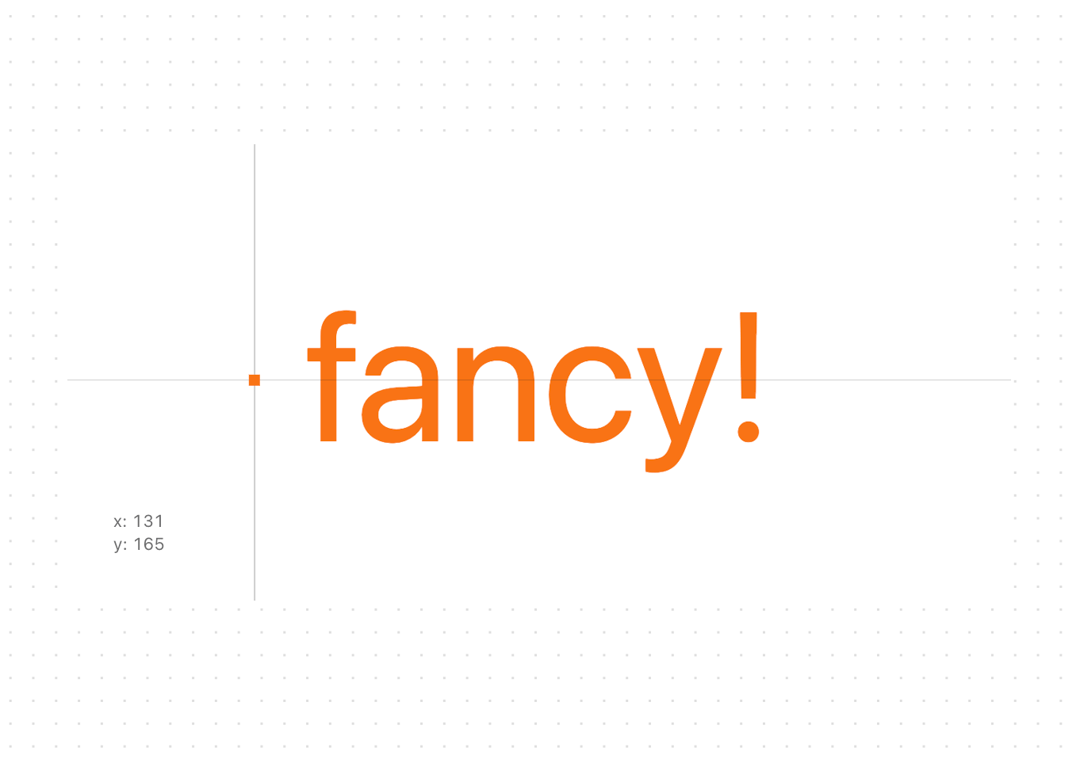
A text component that animates the font variation settings based on the cursor position. Works only with variable fonts.
Built with React and Tailwind. Copy the prompt and paste it into Claude Code, Cursor or Lovable: your agent adds Variable Font And Cursor to your project and fits it to your theme.
Code
How Variable Font And Cursor is used: the demo's code. The component's own source comes with a free account.
Usage.tsx
import { useRef } from "react";
import { useMousePosition } from "@/components/hooks/use-mouse-position";
import { useMousePositionRef } from "@/components/hooks/use-mouse-position-ref";
import { VariableFontAndCursor } from "@/components/ui/variable-font-and-cursor";

function InteractiveFontDemo() {
  const containerRef = useRef<HTMLDivElement>(null);
  const { x, y } = useMousePosition(containerRef); // Для полосок
  const mousePositionRef = useMousePositionRef(containerRef); // Для текста

  return (
    <div
      className="w-full h-full rounded-lg items-center justify-center font-overusedGrotesk p-24 bg-background relative cursor-none overflow-hidden"
      ref={containerRef}
    >
      <div className="w-full h-full items-center justify-center flex">
        <VariableFontAndCursor
          label="fancy!"
          className="text-5xl sm:text-7xl md:text-9xl text-orange-500"
          fontVariationMapping={{
            y: { name: "wght", min: 100, max: 900 },
            x: { name: "slnt", min: 0, max: -10 },
          }}
          containerRef={containerRef}
        />
      </div>

      <div className="absolute bottom-8 left-8 flex flex-col font-azeretMono">
        <span className="text-xs text-foreground/60 tabular-nums">
          x: {Math.round(x)}
        </span>
        <span className="text-xs text-foreground/60 tabular-nums">
          y: {Math.round(y)}
        </span>
      </div>

      <div
        className="absolute w-px h-screen bg-foreground/20 top-0 -translate-x-1/2"
        style={{
          left: `${x}px`,
        }}
      />
      <div
        className="absolute w-screen h-px bg-foreground/20 left-0 -translate-y-1/2"
        style={{
          top: `${y}px`,
        }}
      />
      <div
        className="absolute w-2 h-2 bg-orange-500 -translate-x-1/2 -translate-y-1/2 rounded-xs"
        style={{
          top: `${y}px`,
          left: `${x}px`,
        }}
      />
    </div>
  );
}

export { InteractiveFontDemo }
Dependencies
More by Daniel Petho
View all
Parallax Floating
2.3K
Text Rotate
2.1K
Typewriter
1.9K
Marquee Along SVG Path
1.5K
Image Trail
1.4K
Animated Gradient With SVG
897
Text Cursor Proximity
797
Pixel Trail
653
More in Text
View all
Motion Blur Text
45

Rainbow Text Effect
58

Short Slide Down
45
Blur Reveal
72

Text Reveal
29
Apple Hello Effect
659
Text Highlight
96

Scroll Fill Headline
13

